
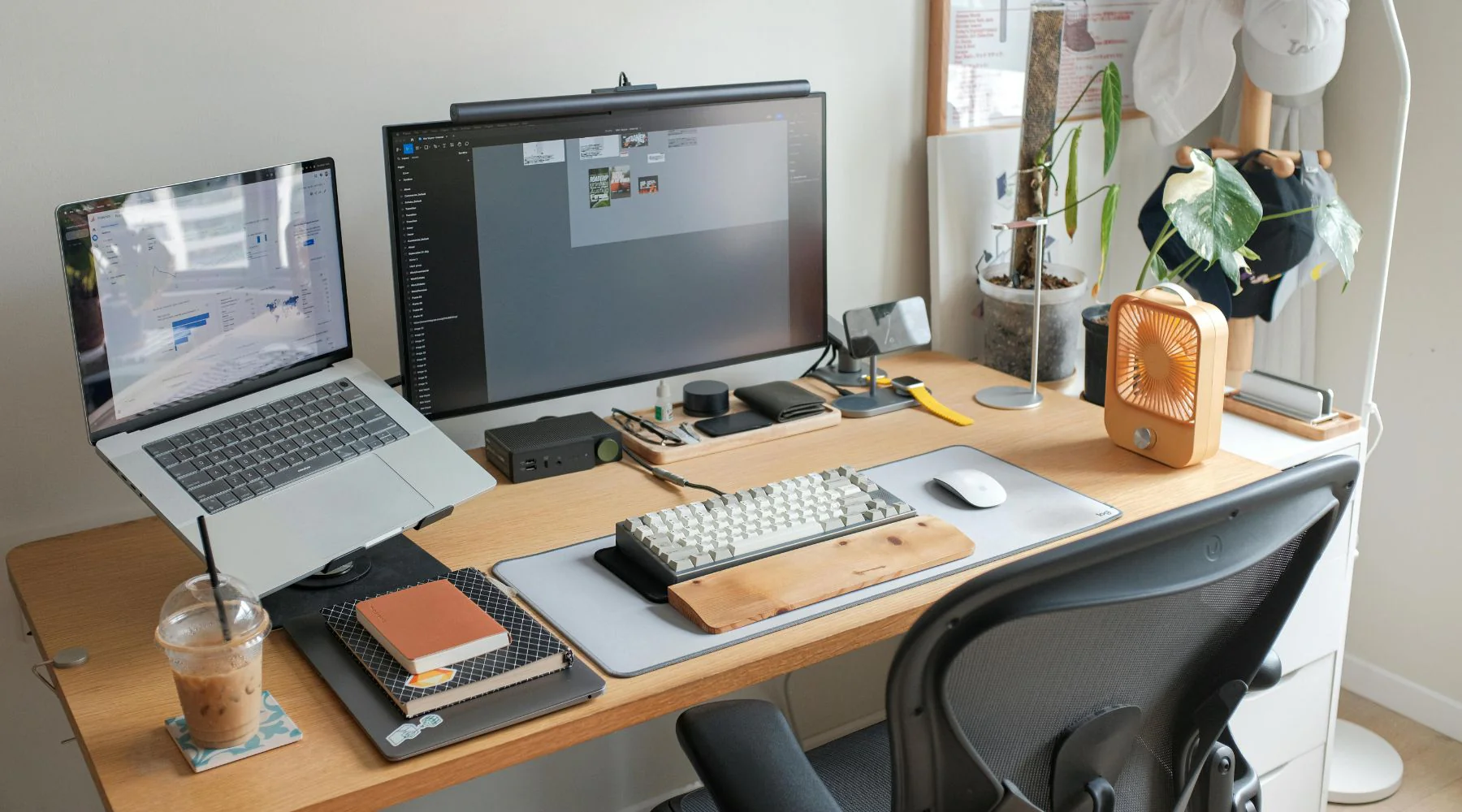
A messy workspace steals focus before the day even has a fair start. The right tech setup can turn a cramped desk, spare bedroom, or shared apartment corner into a work zone that feels calm, fast, and ready for serious output. For many Americans working from home, freelancing after hours, or running a small business from the kitchen table, productivity is not only about discipline. It is about removing the tiny frictions that keep breaking attention.
A good workspace does not need to look like a showroom. It needs a reliable screen height, clean audio, steady internet, smart lighting, and fewer cables fighting for space. Even small upgrades matter when your day includes Zoom calls, Google Docs, invoices, email, and five tabs you swore you would close. For practical workplace growth ideas beyond gear, resources like digital productivity support can help readers think about how smarter systems support better work habits. The goal is simple: make your tools disappear into the rhythm of the day so your brain can stay with the work.
Build the Desk Around Your Actual Workday
The best workspace starts with honest observation, not shopping. Many people buy gadgets before they understand how their day actually moves, then wonder why the desk still feels annoying. A tax preparer in Ohio, a remote sales rep in Texas, and a student in California may all use laptops, yet their setups should not look the same. The desk has to serve the work pattern first.
Match Your Screen Layout to Your Mental Load
A laptop alone can handle email, writing, and light admin, but it often turns serious work into constant window shuffling. That hidden switching cost drains energy. A second monitor helps when your job requires comparing files, checking dashboards, joining calls, or keeping notes open beside the main task.
A practical home office technology upgrade is a 24-inch or 27-inch monitor placed at eye level. The change feels small until you stop hunching over a laptop for six hours. A paralegal reviewing PDFs, for example, can keep the document on one screen and notes on the other, which cuts the stop-start rhythm that makes work feel heavier than it is.
Bigger is not always better. A huge screen on a shallow desk can force your eyes to travel too much, which creates its own fatigue. The smarter move is balance: one primary screen in front, one support screen to the side, and nothing placed where your neck pays the price.
Give the Laptop a Supporting Role
A laptop is a great portable machine, but it is a poor full-day workstation when it sits flat on the desk. The keyboard is too low when the screen is right. The screen is too low when the keyboard feels right. That design tradeoff works at a coffee shop, not for a full workweek.
A stand, separate keyboard, and wireless mouse can change the whole posture of the desk. These workspace productivity tools do not feel exciting, but they carry more value than flashy devices. Your shoulders relax, your wrists sit cleaner, and your eyes stop dipping toward the screen every few seconds.
There is a counterintuitive truth here: making the laptop less central often makes it more useful. When it becomes the engine rather than the whole cockpit, you can dock it, undock it, and keep your main desk stable. That stability makes work feel less scattered before you even open the first app.
Make Cables, Power, and Internet Boring
Nothing kills the mood of a clean desk faster than a wire nest, a dead battery, or Wi-Fi that drops during a client call. This is where productive workspaces are won in quiet ways. The boring parts of a setup should stay boring because every surprise from power or connection costs focus.
Use Desk Cable Management Before Buying More Gear
Cable chaos usually grows one device at a time. A charger stays plugged in. A webcam cable crosses the keyboard. A monitor wire hangs behind the desk. Then one day, the whole area feels stressful, even if every device works.
Desk cable management starts with giving every wire a path. Use adhesive clips under the desk, a cable tray along the back edge, and short cable ties for extra length. A New York apartment renter who cannot drill into the wall can still use removable clips and a floor cable box to keep cords away from feet and chair wheels.
The unexpected benefit is mental, not visual. Once wires stop moving around, the desk feels settled. You do not waste small pieces of attention pushing chargers aside or tracing which cable belongs to which device.
Treat Wi-Fi Like Office Equipment
A weak router placement can make an expensive computer feel cheap. Many homes in the USA have routers tucked behind a TV, inside a cabinet, or in a far corner because that is where the cable enters the house. Convenience for the installer becomes pain for the worker.
A better remote work setup may need a mesh Wi-Fi system, Ethernet adapter, or router move. Video calls, cloud backups, shared drives, and browser-based tools all depend on stable connection. When Wi-Fi fails, the worker often blames the laptop, the app, or the meeting platform. Often, the signal path is the real problem.
Hardwiring the main desk with Ethernet is still underrated. It may not look modern, but it works. For people who handle client calls, telehealth admin, online tutoring, or customer support, a stable wired connection can be worth more than the newest webcam.
Choose Audio, Lighting, and Camera Tools That Reduce Friction
Once the desk works, the next layer is how you show up. Remote work made every spare room into a meeting room, but most people still fight bad sound and harsh lighting. This part matters because communication is work. If people struggle to hear you, see you, or understand you, your setup is costing you trust.
Fix Sound Before You Upgrade the Camera
Clear audio beats sharp video almost every time. A grainy face is tolerable. Choppy sound makes people tired, impatient, and less confident in what you are saying. Anyone who has sat through a Monday meeting with echo knows this pain in their bones.
A simple USB microphone or quality headset can make home office technology feel more professional without turning the desk into a studio. A project manager in Florida does not need a podcast rig for daily standups. They need voice clarity, low background noise, and a mic that stays in the same place every time.
Room sound matters too. Bare walls, tile floors, and empty rooms create echo. A rug, curtains, bookcase, or fabric chair can soften the room more than people expect. The fix is not always another device. Sometimes the room needs to stop bouncing your voice back at you.
Use Lighting That Matches Human Energy
Bad lighting makes work feel harder than it should. Overhead lights can cast shadows under your eyes. Bright windows behind you can turn your face into a silhouette. Dim rooms can make afternoon tasks feel like midnight chores.
Good lighting should land on your face and desk without glare. A small desk lamp with adjustable brightness, placed slightly to the side, can make video calls cleaner and reading easier. Natural light helps, but it needs control. Blinds or curtains keep the sun from turning a pleasant room into a squinting contest.
This is where many people overspend on cameras. A midrange webcam in good light often looks better than an expensive camera in a poor room. The setup should support energy, not vanity. Better light keeps you alert, helps others read your expression, and makes the workspace feel alive through long afternoons.
Create Digital Systems That Keep the Desk Calm
Physical tools only solve half the problem. A clean desk with a chaotic desktop still feels messy. The last layer is digital order: files, apps, notifications, and routines that keep work from leaking into every corner of the screen. This is where the setup becomes a system.
Build a Simple App Zone for Daily Work
Many workers lose time because their apps have no home. One browser window holds email, shopping tabs, payroll, half-read articles, and a recipe from last night. That clutter turns the screen into a junk drawer.
Create one app zone for daily work. Keep communication tools in one area, project files in another, and deep work apps separate from distractions. These workspace productivity tools can be as simple as browser profiles, pinned tabs, desktop folders, or a note app with clear sections.
The counterintuitive move is to use fewer apps, not more. More software does not mean more control. A small business owner in Arizona may get better results from one calendar, one task list, and one shared drive than from six overlapping platforms with alerts fighting for attention.
Set a Shutdown Routine That Resets Tomorrow
The end of the workday shapes the next morning. If you leave files scattered, tabs open, chargers unplugged, and notes unfinished, tomorrow starts with yesterday’s mess. That is not a character flaw. It is a setup flaw.
A strong remote work setup includes a five-minute shutdown. Save files, close finished tabs, plug in devices, clear the desk surface, and write the first task for tomorrow. This small routine gives your brain a clean handoff. It also protects personal time because the workday has a visible ending.
The Tech Setup that works best is not the one with the most expensive gear. It is the one that lowers resistance every time you sit down. Start with the problem you feel most often: sore neck, weak Wi-Fi, messy files, bad audio, or cables everywhere. Fix that first, then move to the next layer. Your workspace does not need to impress anyone on social media. It needs to help you think clearly, communicate well, and finish work without feeling like the desk fought you all day. Choose one upgrade this week, make it stick, and let your workspace earn its place in your routine.
Frequently Asked Questions
What are the best tech setup ideas for a small home office?
Start with a laptop stand, external keyboard, wireless mouse, monitor, and better lighting. These upgrades improve posture, focus, and call quality without taking much space. Keep cables off the floor and choose compact tools that fit the desk you already have.
How can I make my workspace more productive without spending much?
Fix the layout before buying gear. Raise the screen, clear visual clutter, organize files, silence non-work alerts, and create a daily shutdown routine. Low-cost changes often remove the biggest distractions because they target friction instead of decoration.
What equipment do I need for a remote work desk?
A reliable computer, stable internet, comfortable chair, monitor, keyboard, mouse, webcam, microphone, and desk lamp cover most needs. Some workers also benefit from Ethernet, noise-canceling headphones, or a docking station, depending on calls, file sizes, and daily software use.
How do I improve video call quality from my desk?
Place light in front of you, keep the camera at eye level, and use a dedicated mic or headset. Avoid sitting with a bright window behind you. Clear audio and steady lighting usually improve call quality more than buying a premium camera.
Why does desk cable management matter for productivity?
Loose cables create visual noise, snag on chairs, and make small tasks annoying. Organized wires make the desk easier to clean, safer to use, and calmer to look at. A cable tray, clips, and ties can make the whole workspace feel more controlled.
Is a second monitor worth it for working from home?
A second monitor helps when you compare documents, attend calls while taking notes, manage spreadsheets, or switch between apps often. It reduces window juggling and keeps your main task visible. For simple email and writing, one well-positioned screen may be enough.
How can I set up better Wi-Fi for a home workspace?
Move the router into an open area, avoid cabinets, and keep it away from thick walls when possible. For larger homes, use mesh Wi-Fi. For call-heavy work, Ethernet is the safest choice because it gives the desk a more stable connection.
What is the easiest way to keep a digital workspace organized?
Use a simple folder system, pin only daily apps, close finished tabs, and write tomorrow’s first task before ending work. Avoid spreading tasks across too many tools. A clean digital routine keeps the screen from becoming another source of stress.